I had a theory and a module built to prove it. That’s a dangerous amount of confidence.
The theory went: checkout chokes on the database. Get the catalog off the database’s back, and I’d be golden.
So I ran it locally. Checkout on its own placed 81 orders a minute. Then we let browse traffic loose on the category pages, every page a cache miss on purpose.
19.5 orders a minute. Three out of every four orders… gone.
The database, right? Had to be.
Except it never touched the disk. The machine had memory to spare. Eighteen cores sat there with their feet up.
Checkout was starving, and the database was bored. So what was checkout waiting for?
Its turn
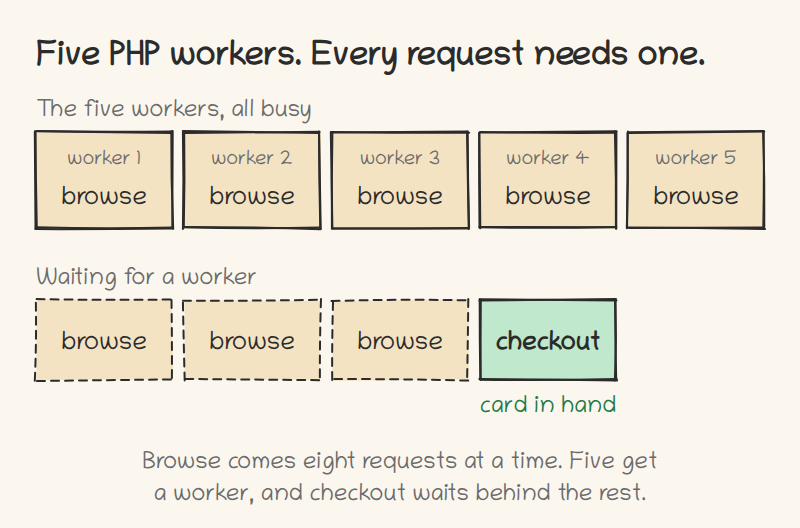
The store had five PHP workers, and every request needs one. A shopper staring at a category page needs one. A customer with a full shopping cart needs one. Same five.
And the browse traffic came eight requests at a time. Eight asking, five answering.
So browse wasn’t eating the database. It was sitting on the workers, and checkout stood in line behind it, card in hand.
I’d been asking the wrong question the whole time. It was never “how do I make the database faster?” It was “how do I get the worker back sooner?” A page that finishes sooner hands its worker to the next request. And sometimes the next request is the one that pays the bills.
Why I was so sure
My thinking went like this. A read is fast. Databases are fast by design, even under load. What hurts is locks and writes. So get the catalog data ready ahead of time, the way a SQL view would, and keep it in OpenSearch, because indexing is what OpenSearch is good at. Browse gets cheap, and checkout gets room to breathe.
Sounds right, doesn’t it?
That was the module: a catalog index. Product data comes from documents instead of from MySQL.
One doubt stayed with me, though. Was I fixing the problem, or just moving it from one data store to the next? So before putting more time into it, we measured. That’s the test you just read.
And this is the heaviest category page from that day. Twelve configurable products, no module at all.
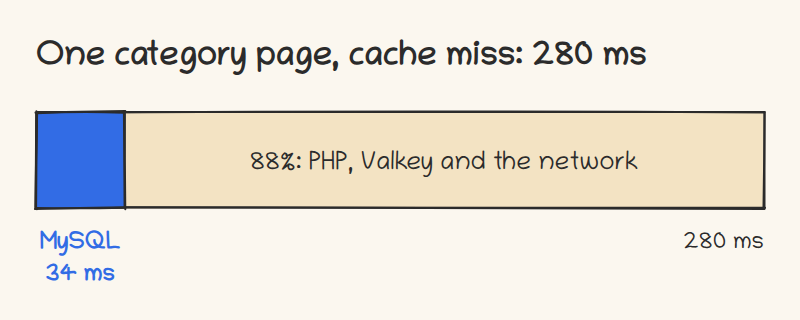
280 milliseconds, and MySQL had 34 of them. See the little blue slice? That was all the database time there was to win.
The rest, 88% of the page, went to PHP, Valkey and the network.
And the index did its job. It cut the database time by two thirds… of the little blue slice. That’s 23 milliseconds, on a page that takes 280.
I went in expecting to strike gold, and I found tostones. (Fried plantains are delicious)
So, back to the board.
The module that stores nothing
At the board the question got smaller. What’s the least we can do to make that page finish sooner?
Here’s what Magento does on a category page. For every configurable product, it goes back to the database for that product’s configurable attributes. Twelve products, twelve trips.
So we wrote a second module that makes one trip for the whole page.
No OpenSearch. No cron. No queue. Nothing stored, so nothing to go stale.
Then the run that matters. The first test had browse going flat out. This one sent it on a clock: 420 requests a minute, a little over half of what the store can take, every one a cache miss, with checkout running next to it. That’s why checkout starts at 37 here and not at 19.5. Orders a minute:
- Neither module: 37
- The index, serving everything it can: 50
- One trip per page, nothing stored: 47
The index got checkout 13 more orders a minute. One trip instead of twelve got 10 of those 13.
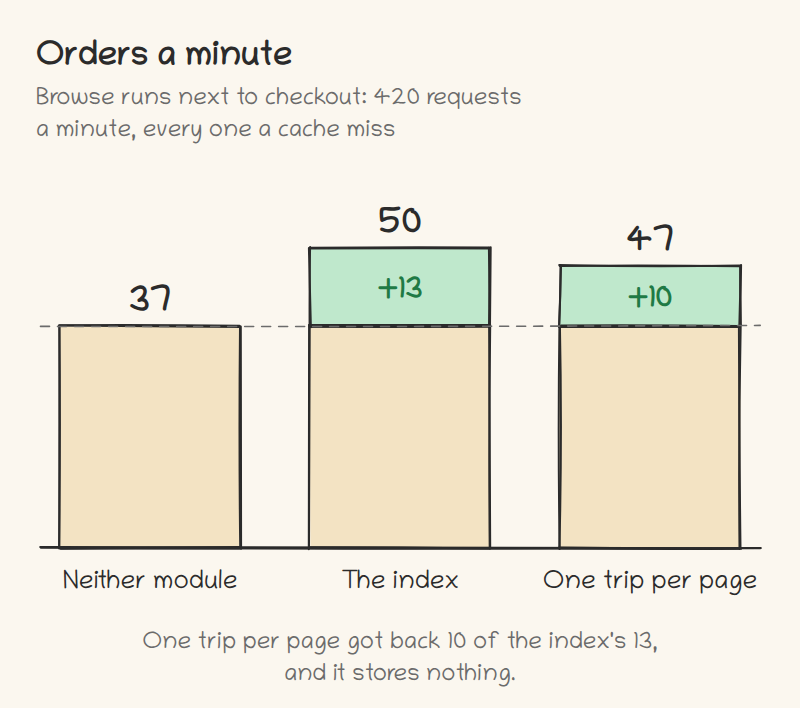
So the index did help checkout… for a reason I never built it for. It didn’t help because MySQL had less to do. It helped because a shorter page gives its worker back sooner: that heavy page went from 280 milliseconds to 208. And asking once per page gets you most of that, with none of the machinery.
How many times you ask turned out to matter a lot more than where the answer comes from.
Should you try this?
One number decides it: how often your full page cache answers a category page.
Everything above happened with the cache out of the way. That’s the worst case, and I picked it on purpose. With a warm cache in front, most browse pages never reach PHP at all. At a 95% hit ratio, those 420 requests a minute turn into about 21 pages that PHP really has to build. That’s not enough to fight checkout for a worker.
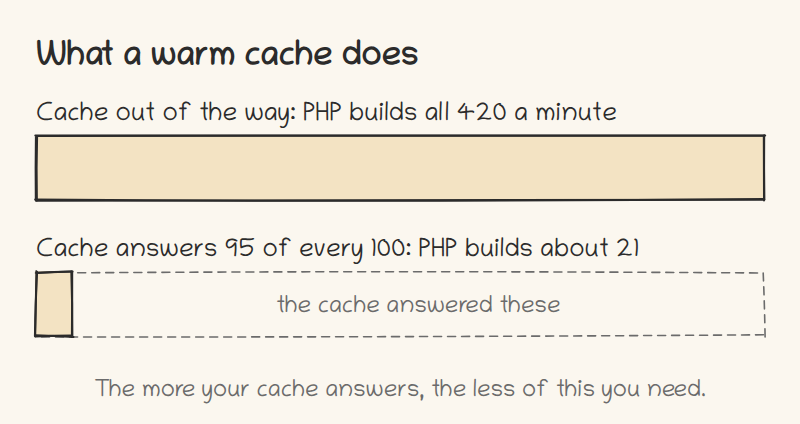
So the more your cache answers, the less of this you need. If it answers almost everything, the cache already solved it, and this post is about a problem you don’t have. (Lucky you.)
Count your workers too. This store had five and ran short. I’d expect a store with workers to spare to gain less.
Measure your hit ratio first. It’s one number. (With Varnish, varnishstat shows you the hits and the misses.)
The recipe
We ran this on Adobe Commerce 2.4.8 with the 2,048 sample products, everything in Docker, five PHP workers.
Your numbers won’t match ours. No two machines are the same, even with the same specs. What should carry over is the shape: browse holding the workers that checkout needs.
We noticed one thing on the way. Search results pages came out a little slower with the one-trip module in our run. We still need to measure that one properly.
We ate the tostones first. Nobody got poisoned.
Both modules are open source, and each README has the install steps:
If you only try one, try catalog-batch, the first link. It’s the one that stores nothing. And let me know how it came out.